
Are you still wasting valuable time trying to build an online leaderboard in an old manual spreadsheet that is often unstable, limited, and prone to frustrating input mistakes? This guide breaks down the limits of classic formulas compared with ProRank.gg, which lets you generate simple, smooth, instantly synchronized leaderboards for every spectator watching live. You will master fast custom-column setup, bulk data imports, and full visual personalization to showcase your results with modern responsive design on every current mobile device.
Create an online leaderboard: why to move beyond Excel in 2026
We have all used Excel to track scores, but honestly, in 2026 it has become an outdated approach. Here is why you should switch.

Technical limits of the classic spreadsheet
Typing every score by hand takes a huge amount of time. It is the perfect environment for human mistakes. Your formulas always start failing when the stakes rise.
Web automation replaces those dusty files with ease. It is cleaner and far more reliable for protecting your valuable competition data.
One calculation error can damage your credibility. A dedicated tool helps you avoid that technical crash.
Benefits of real-time synchronization
Your spectators expect to see scores move immediately. Live updates are no longer a bonus, but a requirement for any serious tournament.
Forget pressing F5 to refresh the page. The experience becomes smooth and natural for anyone following the competition.
That instant update increases adrenaline. It is what keeps your audience fully engaged during a challenge.
Accessibility and multi-device display
Smartphones do not handle tiny unreadable grids well. Adaptive display solves that readability issue without extra effort.
Your participants check results everywhere. On tablet or mobile, the design stays clear and properly balanced.
Rigid spreadsheets have had their time. Modern responsive design is now the standard.
3 steps to set up a high-performing leaderboard
Excel is out of the game. So how do you concretely build a leaderboard that actually works?
Initial setup and participant onboarding
Name your project with absolute clarity. Then list every competitor without missing anyone to avoid last-minute problems. Omissions happen quickly at launch.
Organize participants by categories or groups. This is the foundation for a readable, consistent leaderboard.
A clear structure saves your event. Be precise from day one.
Score settings and measurement units
Choose the format that matches your reality. Euros, seconds, or classic points - technically everything is possible. Adapt the tool to your exact need right away.
Decimal precision also matters a lot. Do not ignore details if you want trusted final results.
Bulk import via CSV or Excel files
Do not waste precious time entering everything manually to create an online leaderboard. Use bulk import to add hundreds of names. It is a highly effective method.
A simple CSV file is enough to launch everything. It is the perfect bridge between your old habits and the future.
The time savings are massive. Finally focus on engaging and energizing your participants.
👉 To get started, create a leaderboard for free.
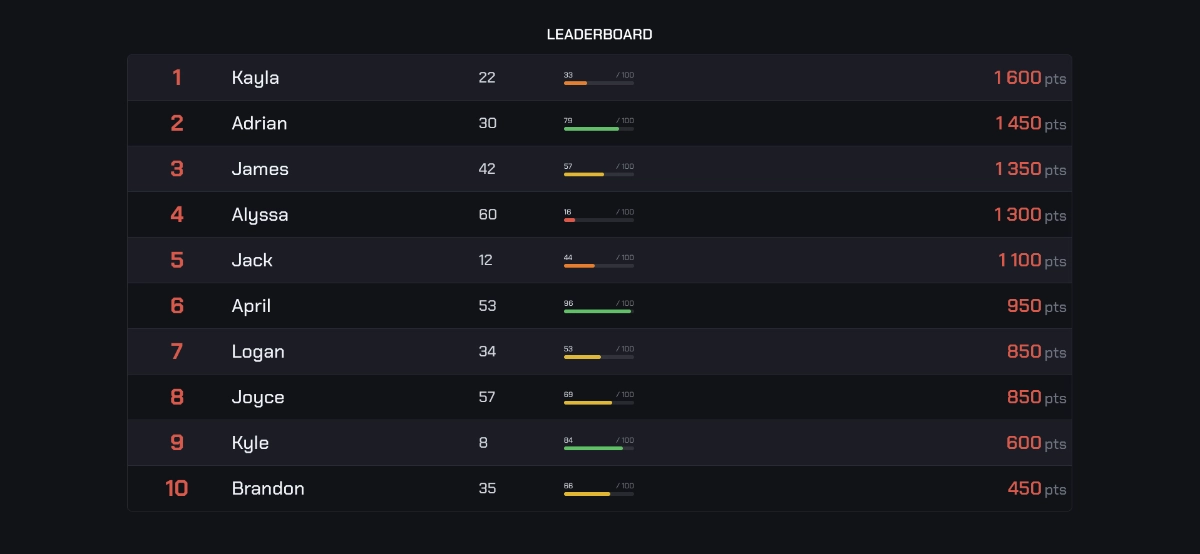
How to customize the look of your results
Once the numbers are in place, the visual impact matters too. The look is what makes the output feel truly professional.
Adapt it to your brand guidelines and logos
Your leaderboard should look like your brand. Update primary colors and choose fonts that stand out. Visual identity strengthens the credibility of your tournament or internal sales challenge. This is a key point.
Add your partner or company logos. This kind of detail turns a basic table into a professional tool. It creates immediate credibility.
Design is not a gimmick. It is your brand image.
Use avatars and background images
Give the competition a face. Add personalized avatars for each participant. This humanizes results and creates healthy momentum.
Pick a background image that sets the atmosphere. Choose a stadium for sports or an office for sales. It is all about context.
Visual personalization captures attention instantly. Your spectators will stay longer on the page. The final rendering should be aesthetic, polished, and genuinely dynamic.
Sharing and data-flow automation
It looks great and it is ready. Now it is time for everyone to see your champions in action.
Share with a public link and iframe embed
Generate a public link in one click for immediate viewing. This is the direct way to publish your results on social media. No technical friction for your followers. It is extremely effective for community engagement.
Copy the iframe code to embed the widget on your blog. Your site becomes the central hub of information. Members access scores without leaving your page.
Distribution stays smooth. Share your wins without delay.
Leave Excel inertia behind and create an online leaderboard that is automated, visually polished, and synchronized in real time. ProRank.gg turns your data into a powerful engagement lever available on every device. Adopt this tool now to professionalize your results: the future of competition is ready for you.
🚀 Ready to go real-time? Create your leaderboard for free!